


Hallmark+
3.26.38K Reviews
App Specs
- Version
- 8.107.2
- Updated On
- License
- Free
- Downloads
- 1,000,000+
- Developer
- Crown Media Holdings Inc.
- Categories
- Entertainment
- Platform
- Android
Screenshots
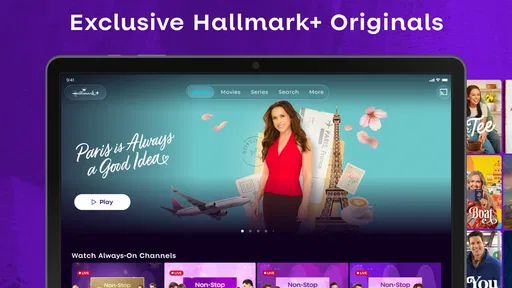
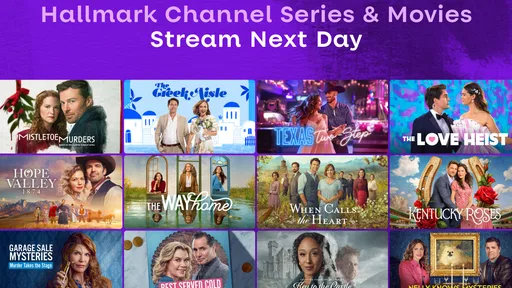


 Analysis by AppCompare
I find Hallmark+ easiest to judge by the kind of evening it serves. It is an entertainment app from Crown Media Holdings Inc., built around Hallmark movies, original series, and related feel-good viewing. If I want a gentle story without spending half the night searching across a broad streaming catalog, that focus is appealing. If I want crime, documentaries, or a wide mix of studios, I would look elsewhere.
What the free price does—and does not—tell you
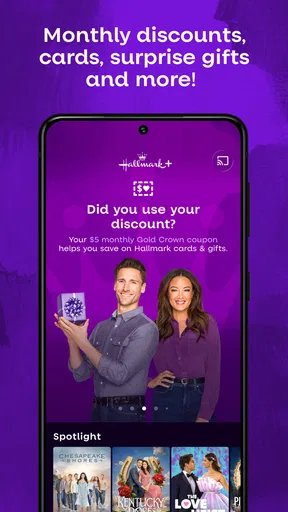
The app is free to download, but that alone does not tell me what watching will cost. It offers in-app purchases ranging from $3.99 to $79.99 per item, so I would check the purchase terms shown in the app before committing. I would not treat “free” as a promise that the full viewing experience costs nothing. The practical question is whether the available access and any paid option suit how often you actually watch Hallmark content.
That distinction matters if you are comparing it with a streaming service you already pay for. Rather than assuming Hallmark+ is automatically a bargain, I would first decide how many of its particular movies and series I expect to watch, then compare that use with the price and terms presented at checkout. A service devoted to one style of entertainment can feel worthwhile to a regular fan, while a casual viewer may get more from a general-purpose service they already use.
Getting Started and Deciding What to Watch
The first thing you need to know is that downloading and setting up Hallmark+ is a breeze. Available on both Android and iOS, the app is user-friendly and doesn’t require you to jump through hoops to get started. Once you’ve downloaded it, signing up is straightforward—just a few taps and you’re in, ready to explore the world of Hallmark.
Interface and Navigation
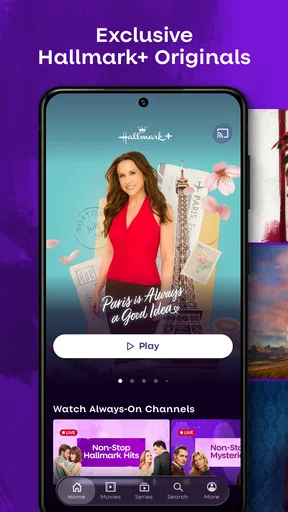
Let’s talk about the interface for a second. One of the first things I noticed was how clean and organized everything is. The homepage showcases a selection of featured movies and series, making it super easy to find something to watch. The navigation bar is intuitive, with sections dedicated to movies, series, and even holiday specials. Trust me, even if you’re a tech novice, you’ll feel right at home navigating this app.
That straightforward layout is most useful when I already know the mood I want: a movie for a quiet night, a series to follow, or something seasonal. It makes browsing feel less like an endless search through unrelated genres. The trade-off is that a focused catalog can only help if its particular tone is what you want. If I am in the mood for sharper comedy, tense drama, or a completely different kind of film, a broader service is the more sensible first stop.
Content Galore
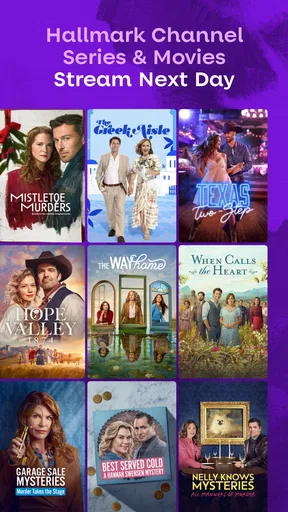
Now, onto the content itself. Hallmark+ boasts a vast library of movies and series that span across genres. Whether you’re in the mood for a romantic comedy, a heartfelt drama, or a festive holiday film, this app has you covered. I was particularly impressed with the selection of seasonal content. Around the holidays, Hallmark+ becomes a wonderland of Christmas cheer. From classics to new releases, there’s something for every Hallmark aficionado.
Worth Reading Before You Choose

EA SPORTS FC Mobile 26 Is a Bigger Football Game, but It Takes Time

Flipboard Shows What News Apps Must Do Beyond the Feed

Switching to Android Auto Means Rethinking Your Driving Routine

Google Calendar Makes a Crowded Week Easier to Manage

Ludo King Makes the Most of the Minutes Between Plans

Baby Panda World Brings Quick Play to Modern Phones, but Its Game Library Feels Busy
What’s more, the app keeps updating its library, so there’s always something new to look forward to. The quality of streaming is top-notch, with options to adjust the resolution based on your internet connection. No more buffering at crucial moments!
Making the catalog work for your routine
For me, the best way to use a focused catalog is to arrive with a small plan rather than browse until I lose interest. I might pick a movie for a weeknight and save a series for a slower weekend, keeping the two kinds of viewing separate. When a seasonal collection matches the time of year, that can also make choosing quicker: I can lean into a festive mood without sorting through unrelated titles. These are simple habits, but they help a niche service feel more useful instead of becoming another app I open and then abandon.
A realistic example is getting home tired, wanting something warm and easy to follow, and not wanting to negotiate over a long list of unrelated choices. This is where Hallmark+ has a clear purpose. It is also a poor fit for a shared household if everyone wants a different genre; in that case, a larger general entertainment catalog is likely to serve more people from one place. I would think about who actually watches before paying for a service centered on a specific style.
Recommendations, watchlists, and a small browsing trade-off
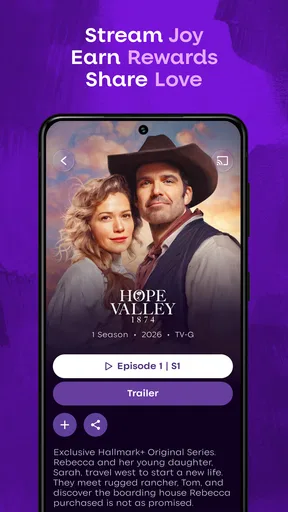
One feature that truly stands out is the personalized recommendations. Based on your watch history, Hallmark+ suggests movies and series that align with your taste. It’s like having your own little movie guru guiding you through the sea of content. Another cool feature is the ability to create watchlists. You can save movies and shows that catch your eye and come back to them whenever you want. Perfect for those lazy Sundays when you just want to binge-watch.
I find a watchlist especially useful when I am choosing something for later rather than deciding in the moment. If I spot a title that suits a particular mood, saving it gives me a short, personal shortlist to return to. Recommendations can help once the app has a sense of what I watch, but I would treat them as suggestions, not a complete guide to everything I might enjoy. For a fresh start, browsing categories directly may be a better way to avoid having early viewing choices shape what the app puts in front of me.
What to expect from the viewing experience
Resolution adjustment is a practical detail when the connection is inconsistent: choosing a lower setting can be a reasonable trade-off if smooth playback matters more than maximum sharpness. On a reliable connection, I would rather keep the picture quality higher. Either way, I would test a short stretch of viewing before settling in for a long movie, especially if I am watching somewhere the internet can fluctuate. That small check is more useful than discovering a playback problem halfway through a story.
I would also make the purchase decision before planning a whole evening around a title. The app is free to install, but paid items fall within a broad range, and the amount matters more to a frequent viewer than to someone who only wants an occasional movie. Checking the terms attached to the option you intend to use helps prevent a mismatch between your expectations and the actual cost. I would not buy simply because the app is on my phone; I would first decide whether the available content is something I will return to.
Who is likely to get the most from it?
This app makes the most sense for someone who already enjoys Hallmark’s familiar blend of romance, warmth, and reassuring endings, or who wants a dedicated place to browse that kind of viewing. It is also a natural choice for people who plan seasonal movie nights and prefer a focused selection to a general service where the same mood is harder to find. Crown Media Holdings Inc. develops the app, and its specific identity is the point: you are choosing a particular entertainment lane rather than an all-purpose library.
I would recommend comparing it with the services already in your household, not just with other apps in the abstract. A broad streaming service has an advantage when you want variety across studios and genres. Hallmark+ has an advantage when the thing you want is Hallmark-style content and you would rather start in a place organized around it. If you only watch one such movie now and then, the cost of any paid access may be harder to justify; if you return to this kind of story often, that focus can save browsing time and make the app feel more worthwhile.
Device fit and audience
The app is available for Android and iOS, and its minimum Android requirement is version 5.0. The content rating is Teen, which is useful context for households deciding whether the app suits a younger viewer; I would still make choices based on the individual title and the family’s preferences rather than treating an age label as a substitute for judgment. It is free to install, and the current version is 8.102.0. Those details help answer basic compatibility questions without changing the central decision: whether this catalog matches what you want to watch.
Hallmark+ has an average rating of 3.3 from around 14,000 ratings, with roughly 6,300 written reviews and over a million installs. I take that as a reason to weigh personal fit carefully rather than assume every viewer will have the same experience. A focused catalog can be a real strength for fans and a limitation for everyone else. The rating is one point of context, but it cannot tell me whether its particular mix of movies and series is right for my evening.
Final Thoughts
In the realm of streaming apps, Hallmark+ is a delightful addition, especially if you're a fan of its signature wholesome content. It’s easy to use, packed with delightful features, and offers a treasure trove of movies and series that bring a smile to your face. Whether you’re a long-time Hallmark enthusiast or a curious newcomer, this app is definitely worth a try.
So grab your favorite blanket, make some hot cocoa, and let Hallmark+ transport you to a world of heartwarming stories and happy endings. Trust me, you'll be hooked!
My buy-or-skip verdict
I would try it if I regularly seek out Hallmark movies or series and want a dedicated place to find them. I would skip it if I expect one app to cover every genre, or if I only want the occasional title and cannot make the available paid terms worthwhile. The free download makes it easy to explore, but the in-app purchase range means I would pause to read the actual offer before spending. For the right viewer, the appeal is a more direct route to a familiar kind of comfort watch; for everyone else, a broader service may be the better value.
Pros
- Extensive library of Hallmark movies.
- User-friendly interface and navigation.
- Available on multiple devices.
- Offline viewing option available.
- Regular updates with new content.
Cons
- Subscription required for full access.
- Limited content outside Hallmark genre.
- No live TV streaming feature.
- Occasional buffering issues reported.
- Content availability varies by region.
FAQs for Hallmark+
What is Hallmark+ and what content does it offer?
Hallmark+ is a streaming service that offers a wide array of content, including romantic movies, family dramas, and holiday specials, all from the Hallmark Channel. It provides a curated selection of classic and new content that appeals to audiences looking for feel-good entertainment. Subscriptions grant access to exclusive premieres and a vast library of heartwarming stories.
How much does a Hallmark+ subscription cost?
The subscription cost for Hallmark+ varies depending on the plan you choose, such as monthly or yearly subscriptions. Typically, a monthly plan can range around $5.99 to $7.99, while an annual subscription offers savings. Prices may also vary based on promotions or bundles with other services, so it's wise to check the official website for current details.
Can I download content from Hallmark+ for offline viewing?
Yes, Hallmark+ allows users to download select movies and shows for offline viewing. This feature is particularly useful for users who want to watch content without a constant internet connection, such as during travel. However, not all content may be available for download, so users should check each title's availability within the app.
On which devices is Hallmark+ available?
Hallmark+ is accessible on a variety of devices, including smartphones and tablets running iOS and Android, as well as smart TVs, streaming devices like Roku and Amazon Fire TV, and via web browsers on desktops. The app is designed to be versatile, ensuring users can enjoy their favorite content on the device of their choice.
Does Hallmark+ offer a free trial for new subscribers?
Yes, Hallmark+ typically offers a free trial period for new subscribers, allowing them to explore the content and features before committing to a paid plan. The length of the trial can vary, often ranging from 7 to 30 days. Users should check the official website for the most current information regarding trial offers and any terms or conditions that apply.


